> For the complete documentation index, see [llms.txt](https://docs.kemperconnect.de/llms.txt). Markdown versions of documentation pages are available by appending `.md` to page URLs; this page is available as [Markdown](https://docs.kemperconnect.de/common/license-management.md).
# License Management
Licenses enable access to device dashboards and features in KEMPER Connect. This guide covers license activation, management, and grace periods.
## License Overview
### What Licenses Enable
Licensed devices have access to:
* Real-time dashboard data
* Historical data and charts
* Device control functions
* Automation and scheduling
* Site-wide monitoring inclusion
* Report generation
### Unlicensed Devices
Without a license:
* Basic device listing only
* No dashboard access
* Excluded from site analytics
* Limited functionality
## License Status
### Status Types
| Status | Description |
| ------------ | ---------------------------------- |
| Active | Valid license, full access |
| Expiring | Active but expiring within 31 days |
| Expired | License has ended |
| Grace Period | 60-day trial/migration period |
| No License | Never activated |
## Activating Licenses
### Voucher Code Activation
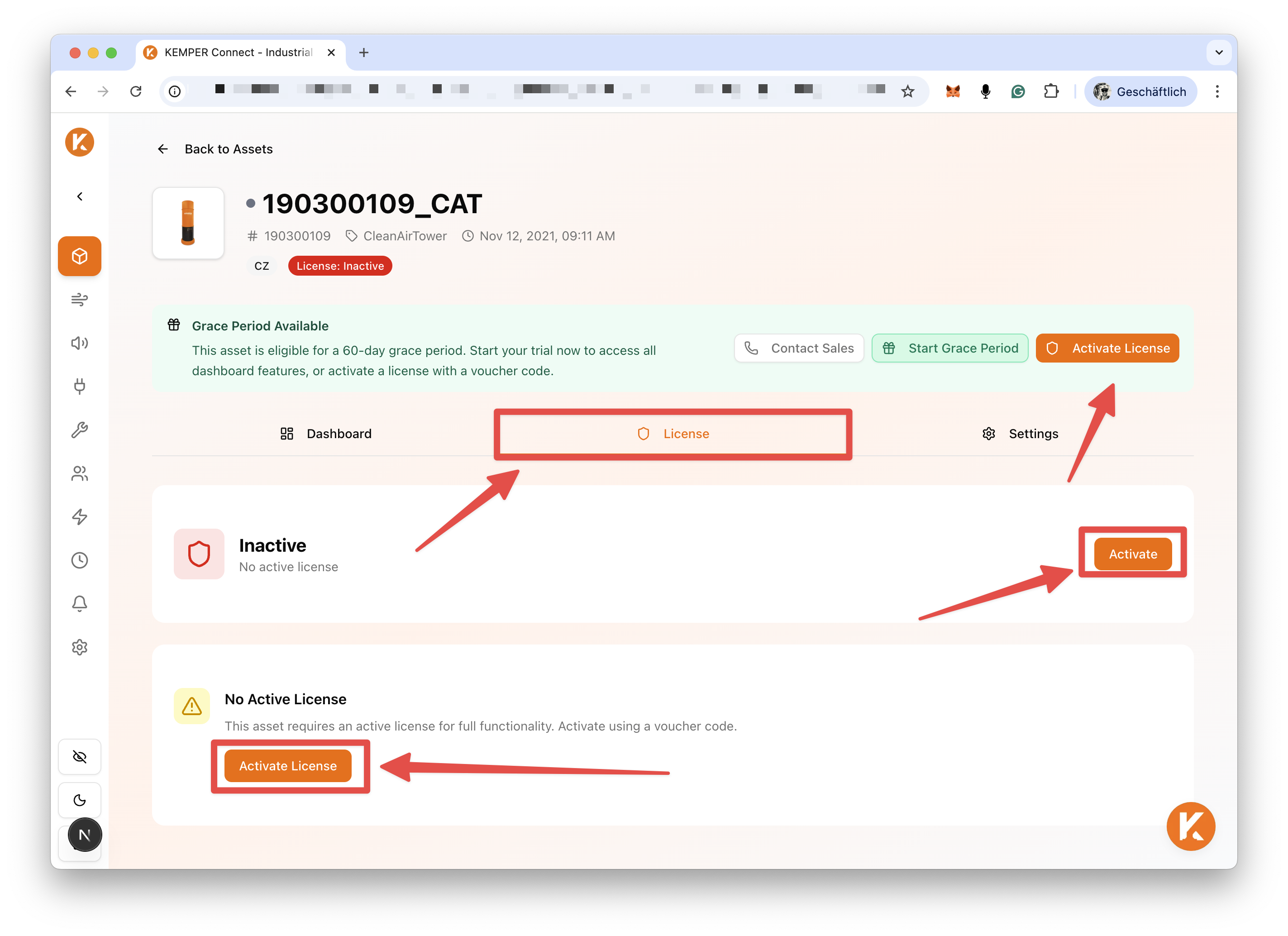
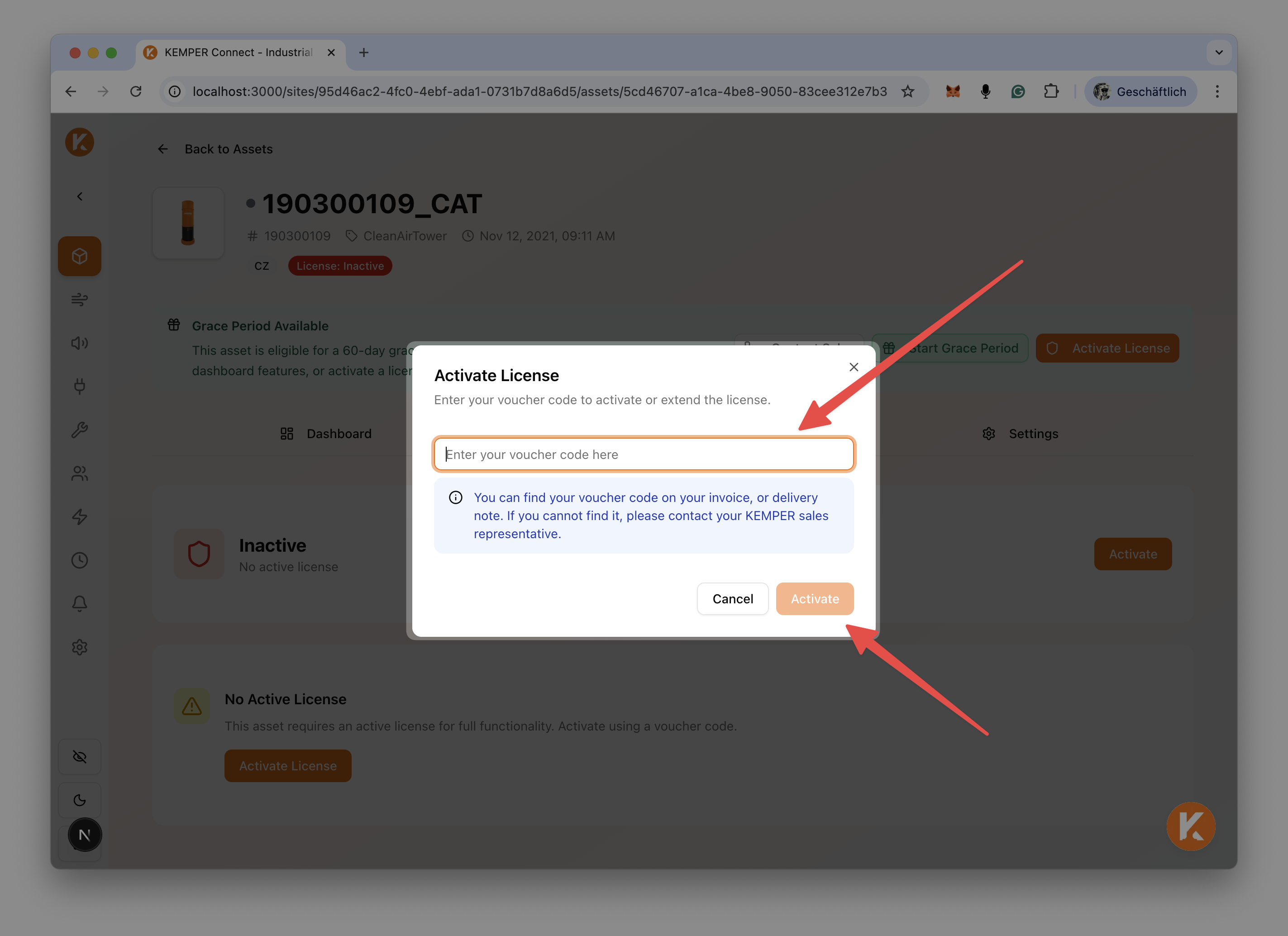
Navigate to device detail page and select the "License" tab.
A modal will appear on your screen.
In this, enter the voucher code, click "Activate" and your License becomes active.
### Voucher Code Format
Voucher codes are provided by KEMPER:
* Alphanumeric format
* Case-sensitive
* Single-use per device
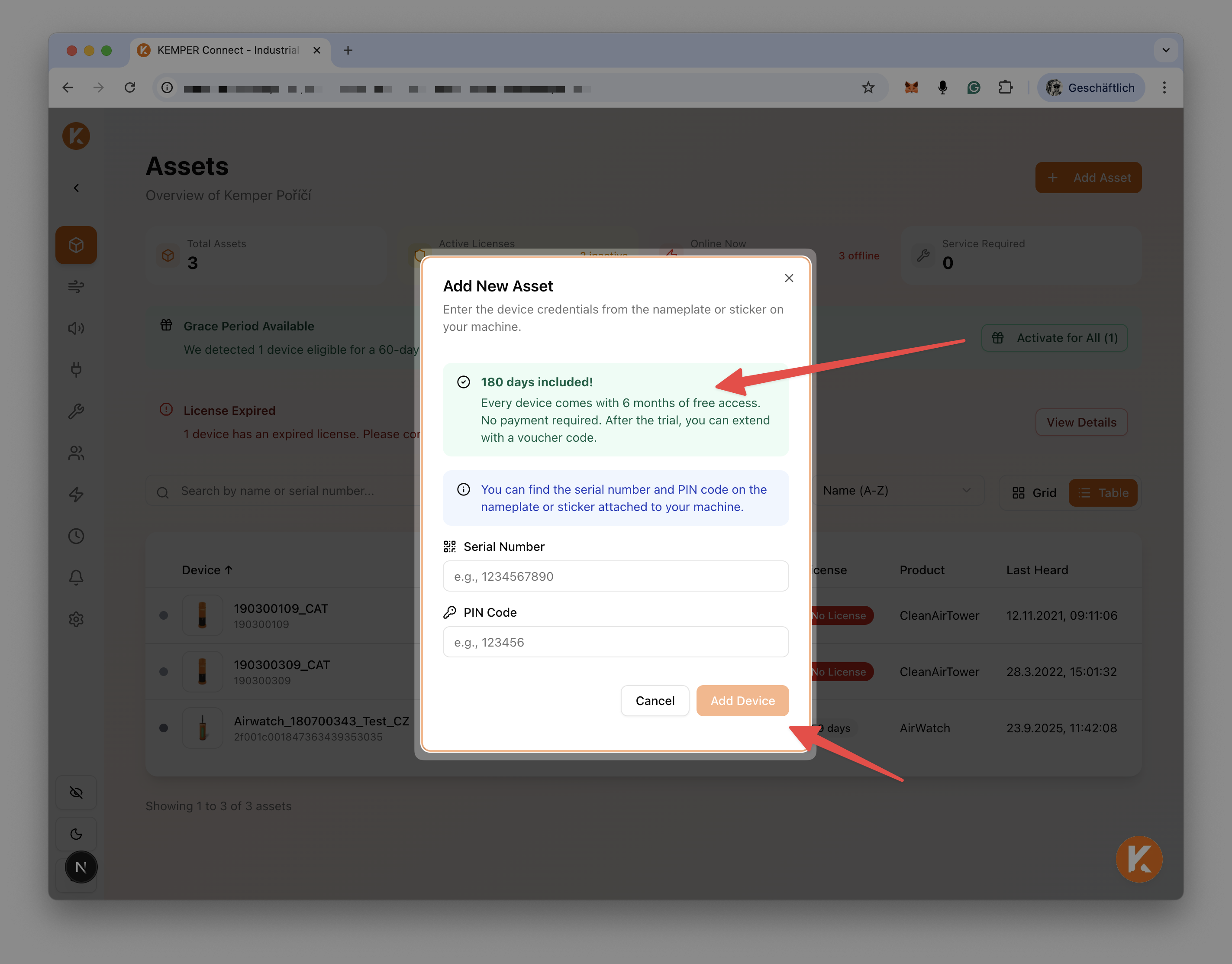
### First Device Trial
When adding a new asset to KEMPER Connect, depending on the license type, this device might be eligible for a 180-days trail phase.
* 180-day trial for new first-time device
* Welcome wizard guidance
* No voucher required
## Grace Period
### What is Grace Period?
A 60-day access period for:
* Existing KEMPER Connect 1.0 users trying the platform and which are migrating from KEMPER Connect 1.0
* Evaluating before purchase
### Grace Period Activation
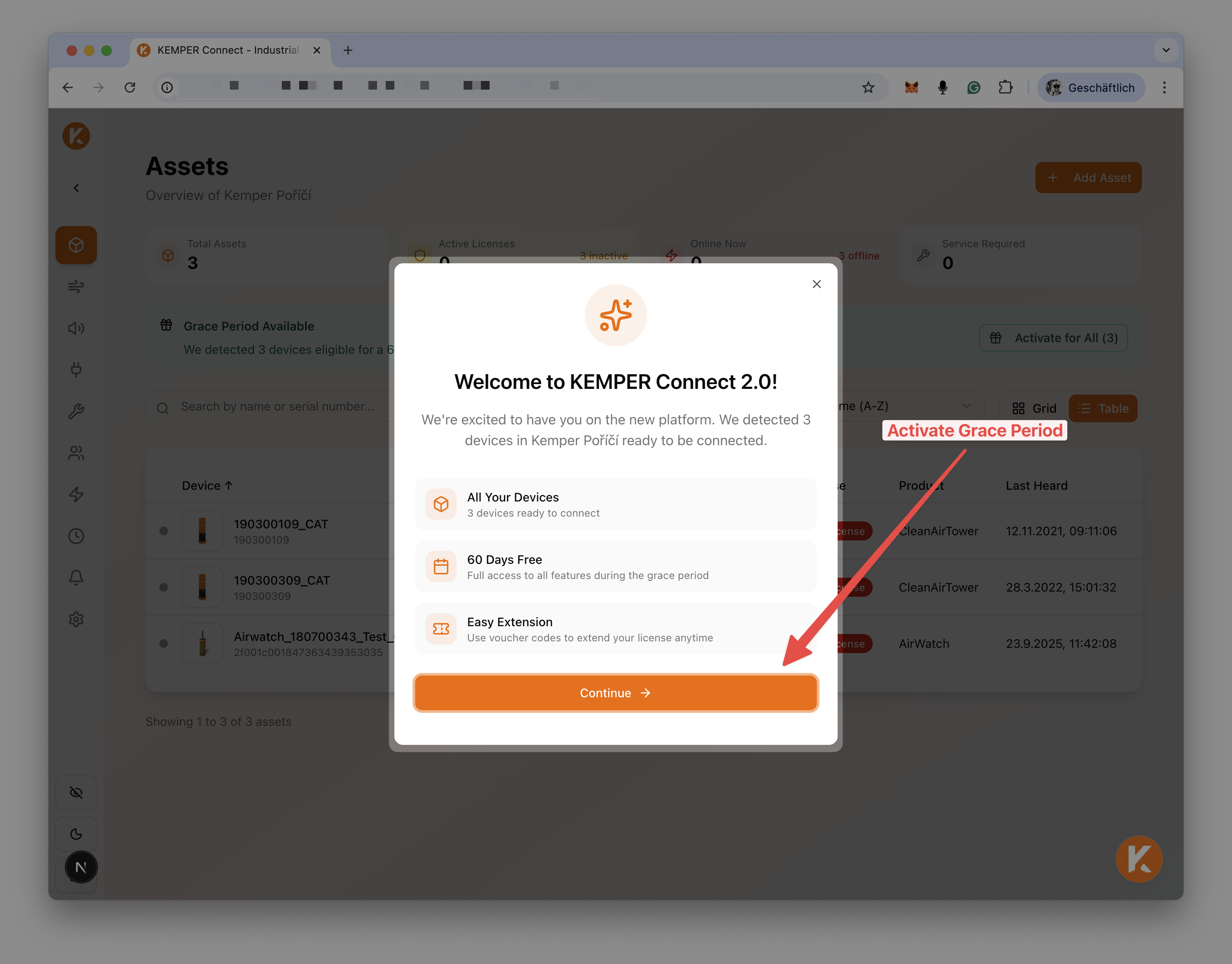
No special actions required. KEMPER Connect will automatically detect if a grace period is valid for you.
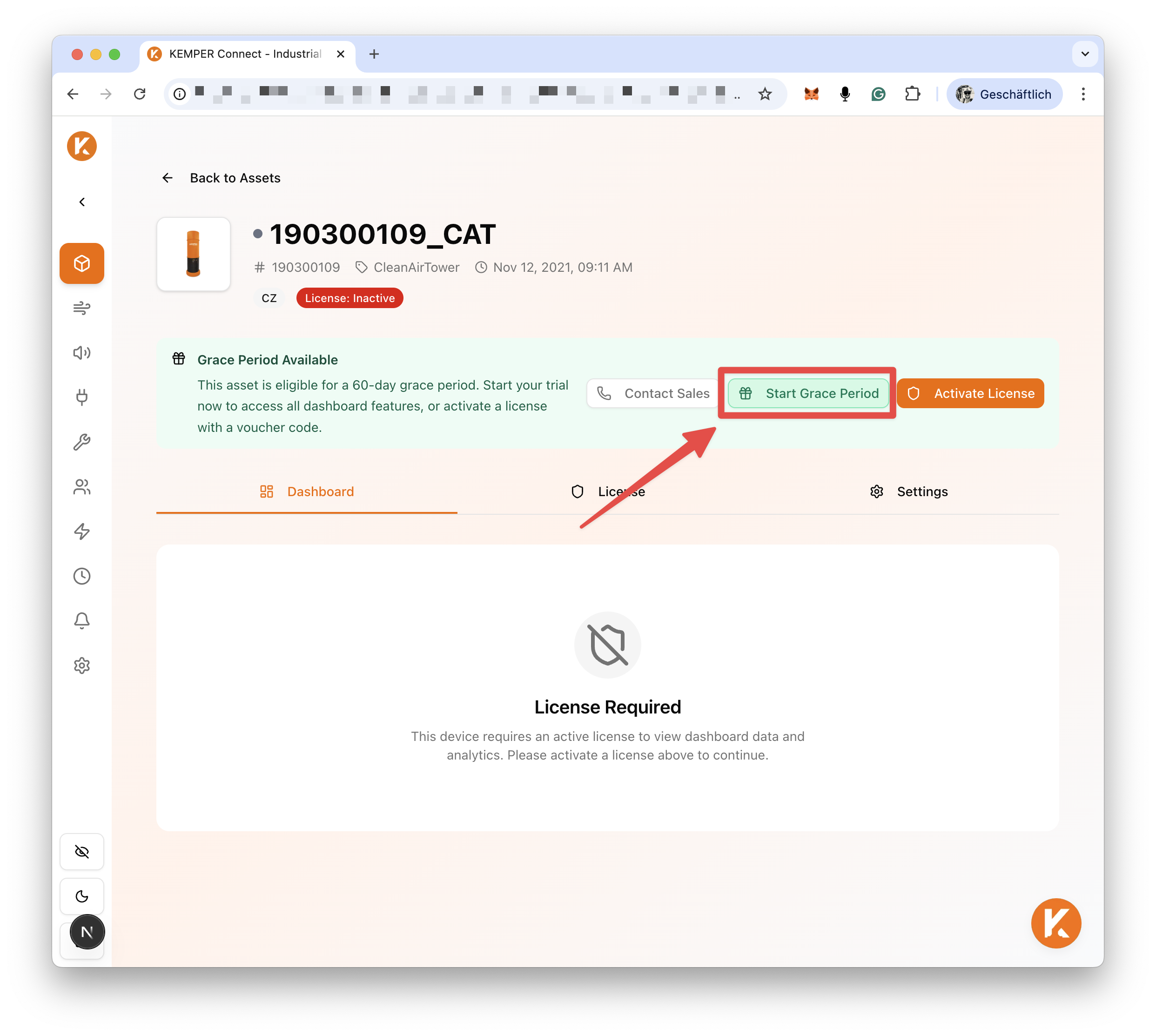
### Activate grace period (for eligible devices)
You can also start a grace period from within the device license page.
1. Alert banner appears on Assets page
2. Banner shows count of eligible devices
3. Click "Activate for All (X)"
4. 60-day period begins immediately for all devices
### Grace Period Features
During grace period:
* Full dashboard access
* All features available
* Same as active license
### After Grace Period
When grace period ends:
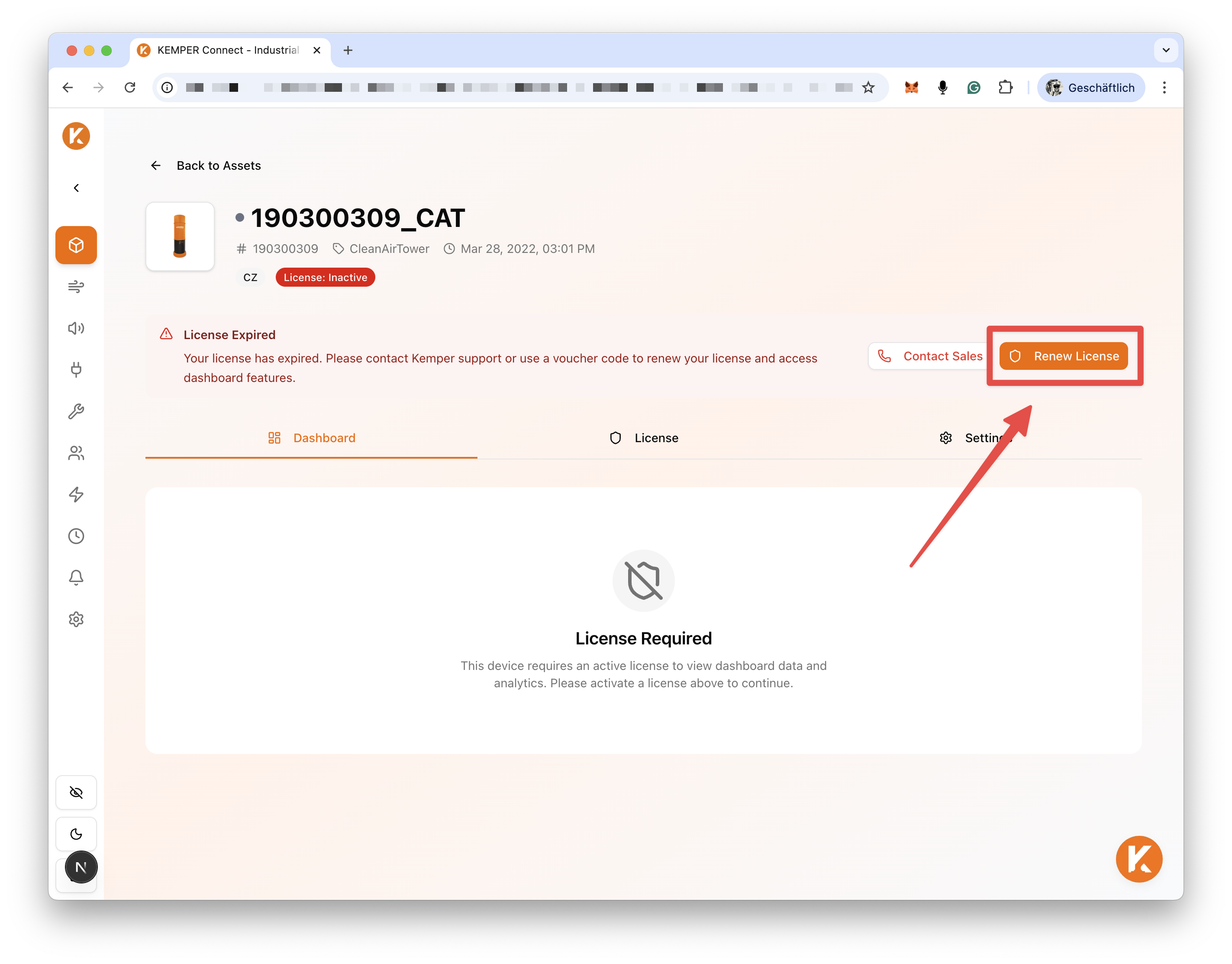
* License status becomes expired
* Dashboard access restricted
* Voucher activation required
## License Tab
Each device has a License tab showing:
### License Information
| Field | Description |
| -------------- | ----------------------------- |
| Status | Current license state |
| Expiration | End date/time |
| Days Remaining | Countdown |
| Type | License type (standard/trial) |
### Actions
| Action | Description |
| -------- | --------------------------- |
| Activate | Enter voucher code |
| Renew | Renew expiring license |
| Contact | Contact KEMPER for purchase |
## License Warnings
### Assets Page Alerts
The assets page shows warnings:
Expired Licenses
* Red alert banner
* Count of affected devices
* Contact support guidance
Expiring Soon
* Yellow alert banner
* Count expiring within 31 days
* Renewal reminder
Grace Period Available
* Blue alert banner
* Count of eligible devices
* Quick activation option
### Individual Device Warning
Device cards/rows show:
* License badge with days/status
* Warning icons for issues
* Visual expiration indicators
## Renewing Licenses
### Before Expiration
{% stepper %}
{% step %}
### Renew before expiration
1. Contact KEMPER support
2. Receive voucher code
3. Activate on device
4. License extends
{% endstep %}
{% endstepper %}
### After Expiration
{% stepper %}
{% step %}
### Renew after expiration
1. Contact KEMPER support
2. Receive renewal code
3. Activate to restore access
{% endstep %}
{% endstepper %}
## Contact Sales Modal
{% stepper %}
{% step %}
### Request license purchase via Contact Sales
1. Click "Contact Sales" or license-related CTA
2. Modal displays contact information
3. KEMPER sales contact details shown
4. Request voucher codes
{% endstep %}
{% endstepper %}
## License and Features
### Feature Availability by License
| Feature | Active | Expired | No License |
| -------------- | ------ | ------- | ---------- |
| Device listing | Yes | Yes | Yes |
| Dashboard | Yes | No | No |
| History | Yes | No | No |
| Functions | Yes | No | No |
| Automation | Yes | No | No |
| Site analytics | Yes | No | No |
| Reports | Yes | No | No |
## Best Practices
{% hint style="info" %}
* Monitor expiration dates
* Set calendar reminders
* Renew before expiration
{% endhint %}
* Track all device licenses for multi-device deployments
* Plan bulk renewals and consider enterprise licensing
* Activate grace period when ready to evaluate and use the full 60 days productively
* Plan purchase before grace period end
---
# Agent Instructions
This documentation is published with GitBook. GitBook is the documentation platform designed so that both humans and AI agents can read, navigate, and reason over technical content effectively. Learn more at gitbook.com.
## Querying This Documentation
If you need additional information that is not directly available in this page, you can query the documentation dynamically by asking a question.
Perform an HTTP GET request on the current page URL with the `ask` query parameter, and the optional `goal` query parameter:
```
GET https://docs.kemperconnect.de/common/license-management.md?ask=&goal=
```
`ask` is the immediate question: it should be specific, self-contained, and written in natural language.
`goal` is optional and describes the broader end goal you are ultimately trying to accomplish on behalf of the user. GitBook uses it to tailor the answer towards what is most useful for that goal.
The response will contain a direct answer to the question and relevant excerpts and sources from the documentation.
Use this mechanism when the answer is not explicitly present in the current page, you need clarification or additional context, or you want to retrieve related documentation sections.