> For the complete documentation index, see [llms.txt](https://docs.kemperconnect.de/llms.txt). Markdown versions of documentation pages are available by appending `.md` to page URLs; this page is available as [Markdown](https://docs.kemperconnect.de/monitoring-and-compliance/noise-level.md).
# Noise Level
## Note
This dashboard is a new feature within the portal and is already available for productive use. However, the respective use case (e.g., energy consumption or noise monitoring) requires specific, dedicated devices. The functionality does not derive data from existing sensors such as air quality or other already integrated devices.
{% hint style="info" %}
Suitable hardware solutions are currently not listed in the standard device catalog. **Please contact our team for individual consultation, device recommendations, or access to a demo setup.**
{% endhint %}
## Overview
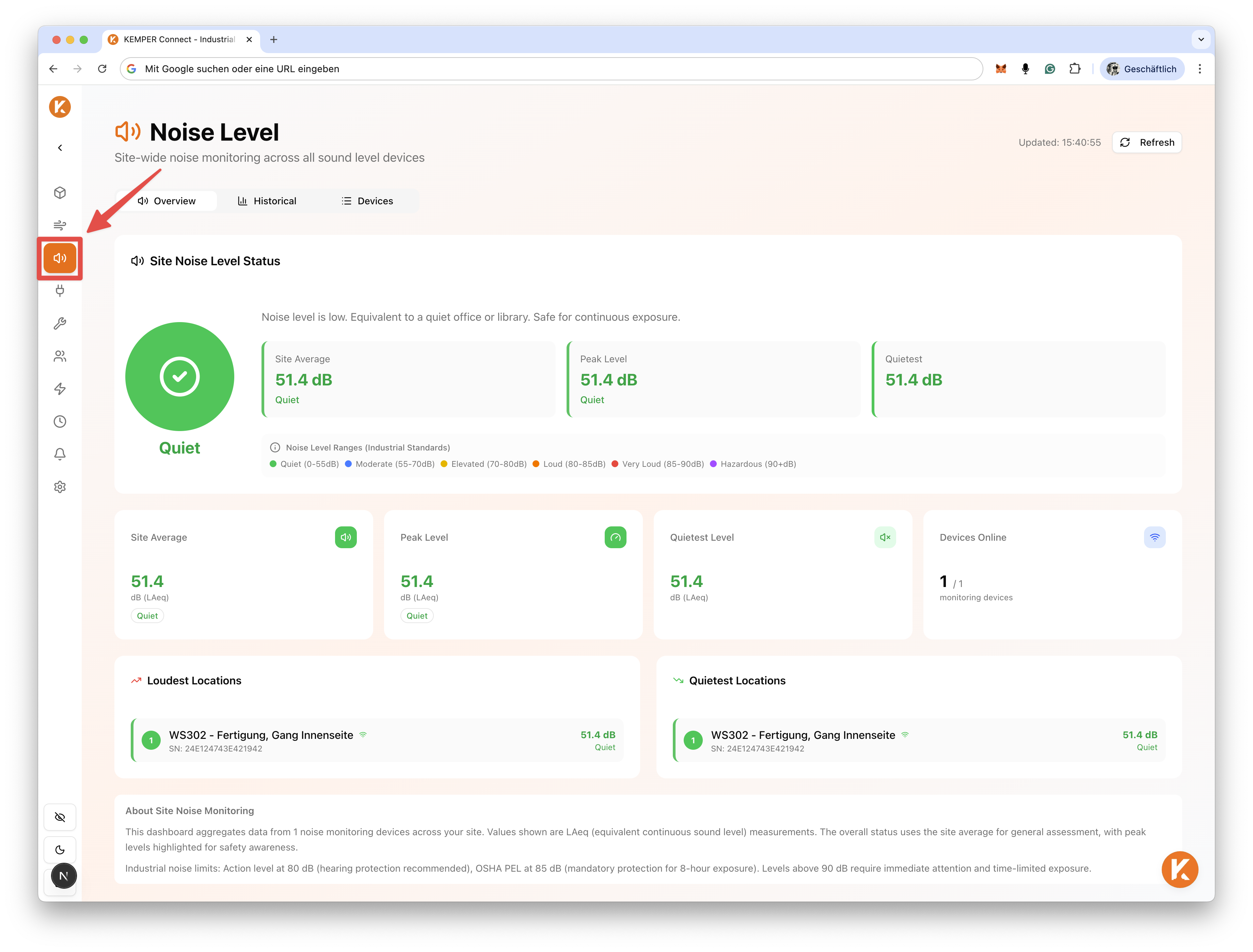
The Noise Level Dashboard is a site-wide monitoring tool that provides an aggregated view of sound pressure levels across all configured noise measurement devices within a workspace or site.
It enables users to monitor overall acoustic exposure and track noise levels across multiple areas or industrial assets.
### KPIs
The dashboard provides a range of noise-related metrics and key performance indicators (KPIs). The most relevant KPIs are outlined below.
#### **Daily Noise Metrics**
The daily metrics display:
* Current or daily average noise level
* The device reporting the highest noise level
* The device reporting the lowest noise level
* The total number of active noise measurement devices
These metrics provide an immediate operational overview of current acoustic conditions on site.
#### **Noise Distribution Statistics**
The Noise Statistics section visualizes the proportional noise contribution per device or measurement point.
For each installed measurement device, the dashboard displays its relative contribution to overall site noise levels. This helps identify high-exposure areas and evaluate distribution patterns across the facility.
## Concept
The Noise Level Dashboard follows the same structural concept as other dashboards within the KEMPER Connect application.
Upon opening the dashboard, aggregated noise data from all configured measurement devices in the workspace or site is displayed. Detailed KPI statistics and device-level breakdowns are then provided to support monitoring and analysis.
## Use Case
The dashboard is designed for monitoring industrial noise levels and acoustic exposure across facilities.
By integrating compatible noise measurement devices into the KEMPER Connect platform, users can generate a consolidated overview of sound levels across all relevant areas within their workspace.
## Devices
In addition to KPIs and noise statistics, the **Devices** tab provides a structured overview of all detected and configured noise measurement devices within the site.
This section displays a table containing device-level information for monitoring and management purposes.
## Historical Analysis
The **Historical** tab provides time-based analysis of noise trends.
Users can:
* View noise levels by day, week, or month
* Compare current periods with previous periods (e.g., day-over-day, week-over-week, month-over-month)
* Analyze percentage changes between selected time ranges
* Review average values for selected periods
All historical data can be exported as Excel or CSV files for reporting, compliance documentation, or further evaluation.
Both absolute values and percentage-based comparisons are available to assess long-term exposure patterns and identify potential compliance or safety risks.
---
# Agent Instructions
This documentation is published with GitBook. GitBook is the documentation platform designed so that both humans and AI agents can read, navigate, and reason over technical content effectively. Learn more at gitbook.com.
## Querying This Documentation
If you need additional information that is not directly available in this page, you can query the documentation dynamically by asking a question.
Perform an HTTP GET request on the current page URL with the `ask` query parameter, and the optional `goal` query parameter:
```
GET https://docs.kemperconnect.de/monitoring-and-compliance/noise-level.md?ask=&goal=
```
`ask` is the immediate question: it should be specific, self-contained, and written in natural language.
`goal` is optional and describes the broader end goal you are ultimately trying to accomplish on behalf of the user. GitBook uses it to tailor the answer towards what is most useful for that goal.
The response will contain a direct answer to the question and relevant excerpts and sources from the documentation.
Use this mechanism when the answer is not explicitly present in the current page, you need clarification or additional context, or you want to retrieve related documentation sections.