> For the complete documentation index, see [llms.txt](https://docs.kemperconnect.de/llms.txt). Markdown versions of documentation pages are available by appending `.md` to page URLs; this page is available as [Markdown](https://docs.kemperconnect.de/common/assets-list.md).
# Assets List
The Asset List provides a centralized overview of all registered devices in your workspace.
## Overview
The Asset List is the central interaction point within your workspace for accessing and managing all Kemper Connect-compatible devices. It provides a structured overview of every registered asset and serves as the primary navigation entry to device-specific views and dashboards.
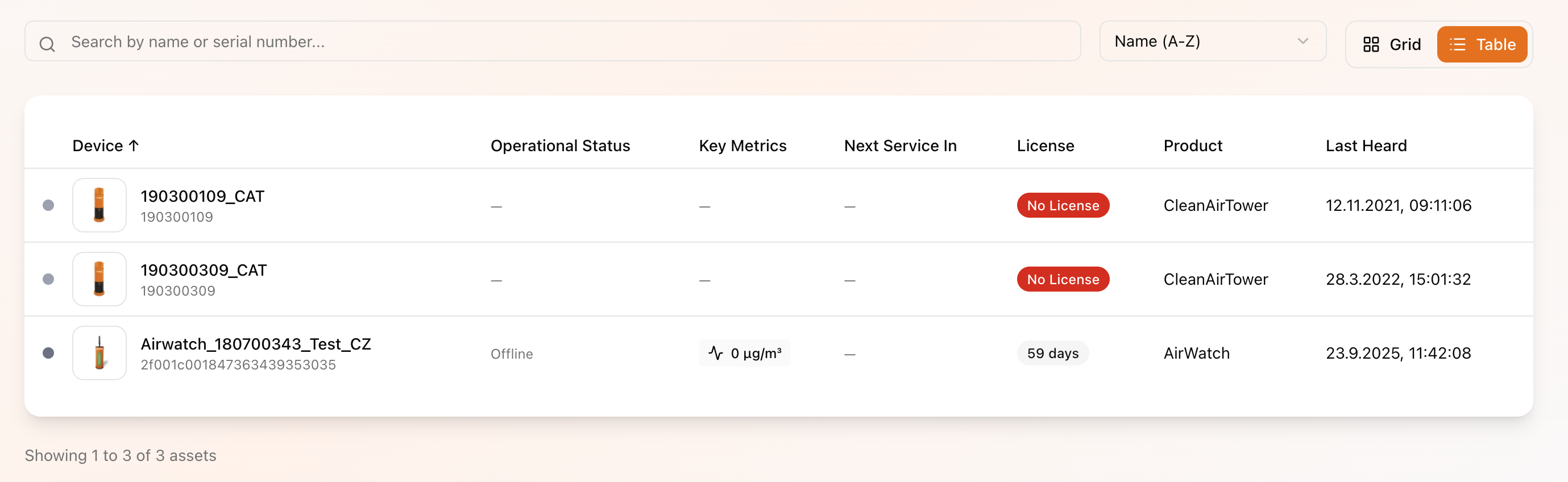
Assets can be displayed either in a structured table format or, alternatively, in a grid view where each asset is represented as an individual card.
## Features
The Asset List does more than simply display all registered devices. It also includes key operational indicators that provide a high-level summary of your asset landscape.
In this sense, the Asset List can be considered a focused sub-dashboard dedicated specifically to asset management and operational visibility.
### Asset KPI Overview
At the top of the page, aggregated KPIs provide a quick overview of the current state of your assets.
#### Total Assets
Displays the total number of assets currently registered within your workspace or site.
#### Assets with Active Licenses
Indicates how many registered assets currently have an active license assigned.
#### Online Assets
Shows the number of devices that have recently transmitted data.
“Online” in this context means that the device has sent data within a defined recent time window. Devices not counted as online are not necessarily offline; they may simply not have transmitted data within that period.
#### Assets with Service Required
Displays the number of devices that currently require maintenance based on configured service intervals.
For detailed service evaluation and status categorization, the dedicated Service Dashboard provides a more comprehensive overview.
### Notification Banners
The Asset List page also serves as a central notification surface.
System-relevant issues such as license expirations, service requirements, or other operational alerts are displayed as banners at the top of the page, ensuring immediate visibility.
### Asset Table
The Asset Table is the primary interaction element of the Asset List.
It provides a structured overview of all assets currently registered within your workspace, enabling quick navigation, status review, and operational checks.
#### Search
For workspaces with a large number of assets, the search function allows users to quickly locate specific devices without manually browsing through multiple pages of results.
#### Table Columns
The Asset Table includes the following information:
* **Name of Asset**\
Displays the asset name. A default name is assigned during registration, but it can be customized at any time.
* **Operations Status**\
Indicates the current operational state of the device, such as online, offline, running, idle, or reporting issues.\
Operational status definitions may vary depending on the specific device type.
* **Key Metrics**\
Shows the primary performance indicator relevant to the respective asset type. Each device category has its own key metric reflecting its core functionality.
* **Next Service In**\
Displays the remaining time (in days or hours) until the next scheduled service interval is due.
* **License**\
Indicates the current license status directly within the table.
* **Product**\
Specifies the asset or product type associated with the device.
* **Last Heard**\
Shows the timestamp of the most recent data transmission received from the device.
---
# Agent Instructions
This documentation is published with GitBook. GitBook is the documentation platform designed so that both humans and AI agents can read, navigate, and reason over technical content effectively. Learn more at gitbook.com.
## Querying This Documentation
If you need additional information that is not directly available in this page, you can query the documentation dynamically by asking a question.
Perform an HTTP GET request on the current page URL with the `ask` query parameter, and the optional `goal` query parameter:
```
GET https://docs.kemperconnect.de/common/assets-list.md?ask=&goal=
```
`ask` is the immediate question: it should be specific, self-contained, and written in natural language.
`goal` is optional and describes the broader end goal you are ultimately trying to accomplish on behalf of the user. GitBook uses it to tailor the answer towards what is most useful for that goal.
The response will contain a direct answer to the question and relevant excerpts and sources from the documentation.
Use this mechanism when the answer is not explicitly present in the current page, you need clarification or additional context, or you want to retrieve related documentation sections.